Evaluating 3D Alphabet Brush Stamps for Digital Design Projects
In the evolving landscape of digital graphic design, the tools available to creators have shifted significantly from traditional vector-based workflows to more intuitive, gesture-driven applications. Among these modern tools, Procreate has established itself as a dominant platform for iPad artists. Within this ecosystem, specialized brushes such as 3D Alphabet Brush Stamps offer a unique intersection between typography and hand-drawn aesthetics. For designers, stationery creators, and content producers aged 20–50, understanding the specific utility, installation process, and comparative advantages of such tools is essential for making informed purchasing decisions.
This analysis explores the functionality of 3D Alphabet Brush Stamps, examining their role in creating digital and printable projects. We will evaluate how these stamp brushes compare to standard typeface integration, discuss the technical requirements for installation, and outline the scenarios where this tool provides the most value versus when alternative methods might be preferable.
Understanding the Tool: What Are 3D Alphabet Brush Stamps?
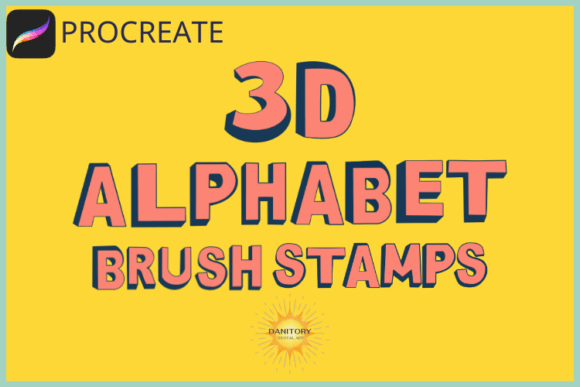
At its core, a set of 3D Alphabet Brush Stamps consists of a collection of pre-designed graphical elements that mimic the appearance of three-dimensional lettering. Unlike standard fonts, which are vector-based outlines that can be scaled infinitely without loss of quality, brush stamps are raster-based or hybrid assets created within the Procreate environment. This specific product includes 36 individual stamps, typically covering the full English alphabet along with common punctuation or decorative symbols.
The distinct characteristic of these stamps is their "hand-crafted" look. They are designed to appear as if they were painted or drawn with physical media but possess the depth and shading associated with 3D rendering. This makes them particularly effective for projects requiring a personal, artisanal touch while maintaining legibility and structure. The inclusion of a complete set allows for versatile text creation, enabling users to spell out custom phrases, titles, or quotes directly on their canvas.
Key Features and Capabilities
- Customizability: While the base shape is fixed, these stamps retain Procreate’s native brush properties. Users can scale, resize, rotate, and adjust opacity. Furthermore, colorization is possible, allowing the 3D effect to be adapted to various brand palettes or project themes.
- Versatility in Output: These stamps are suitable for both screen-based designs (Instagram posts, blog graphics) and print-ready materials (stationery, packaging, wall art). The high resolution ensures crisp edges when exported for physical production.
- Efficiency: Compared to drawing each letter individually or manually adjusting kerning in a font editor, stamp brushes allow for rapid composition. A user can tap to place letters, achieving consistent spacing and style instantly.
Comparative Analysis: Stamp Brushes vs. Traditional Fonts
When evaluating design tools, it is crucial to understand where 3D Alphabet Brush Stamps fit in relation to other common methods, primarily standard digital typography. Both approaches serve the goal of adding text to visual compositions, but they differ significantly in workflow, aesthetic outcome, and technical constraints.
Aesthetic Differences
Standard fonts, even those with 3D effects, often carry the precision of digital engineering. They are clean, uniform, and sometimes perceived as sterile depending on the context. In contrast, 3D Alphabet Brush Stamps introduce subtle imperfections and organic textures inherent to brushwork. This "human" element is highly valued in niche markets such as handmade stationery, boho-style wall art, and personalized gifts. If a project requires a rigid, corporate, or minimalist aesthetic, standard fonts may be more appropriate. However, for creative, playful, or artistic endeavors, the brush stamps provide a warmer, more engaging visual tone.
Workflow and Flexibility Trade-offs
Using traditional fonts involves selecting a typeface, typing text, and then applying effects like extrusion, shadow, or bevel to achieve a 3D look. This process is non-destructive; the text remains editable as vectors until flattening. Conversely, stamp brushes are raster-like in behavior. Once placed, the text becomes part of the pixel data. While Procreate allows for layer adjustments, the text cannot be easily retyped or corrected after placement without deleting and re-stamping the character. Therefore, accuracy in spelling and positioning is critical when using stamp brushes.
However, the trade-off is speed and stylistic consistency. With stamps, the complexity of the 3D texture is baked into the brush stroke. There is no need to manage complex layer styles or blend modes to achieve depth. This can accelerate the design process for users who prioritize visual impact over editable text layers.
Installation and Technical Requirements
One potential barrier to entry for some users is the software requirement. It is important to note that 3D Alphabet Brush Stamps are designed specifically for use with Procreate only. They are not compatible with Adobe Illustrator, Photoshop, or Canva in their native format. This limitation should be considered during the evaluation phase, especially for professionals who work across multiple platforms.
The installation process for iPad users is streamlined but requires attention to file management. The product is delivered as a single brush set file (typically a .brushset file). Below is the standard procedure for installation:
- Download and Unzip: Ensure the downloaded file is unzipped if it arrives in a compressed archive format.
- Navigate to Files: Open the "Files" app on your iPad and locate the downloaded folder containing the brush set.
- Initiate Import: Tap and hold the brush set file. From the context menu, select "Share."
- Select Procreate: If "Open in Procreate" is not immediately visible, click "More," scroll through the list of apps, and select Procreate.
- Confirmation: Procreate will open automatically and prompt you to add the new brushes. Confirm the action, and the 36 stamps will appear in your brush library under a new category.
For users encountering issues, ensuring that the file extension is correctly recognized by iOS is vital. If the automatic import fails, manually opening Procreate first and then importing the file via the brush palette’s "+" menu is an alternative method.
Use Cases and Best-Fit Scenarios
Determining whether to invest in 3D Alphabet Brush Stamps depends largely on the nature of the projects you intend to create. These tools excel in specific niches where personality and texture are paramount.
Ideal Applications
- Stationery and Printables: Creating greeting cards, wedding invitations, or planner stickers benefits from the tactile feel of brush strokes. The 3D effect adds a sense of luxury and craftsmanship to digital files intended for printing.
- Social Media Content: Instagram posts and Pinterest pins often compete for attention in a crowded feed. Bold, textured lettering stands out more effectively than flat text, increasing engagement rates.
- Packaging and Label Design: Small business owners designing labels for candles, soaps, or food products can use these stamps to create custom branding elements quickly without hiring a typographer.
- Illustrations and Doodles: Artists incorporating text into illustrations find that brush stamps integrate seamlessly with hand-drawn elements, maintaining visual harmony.
Limitations and Considerations
While powerful, these stamps are not a universal solution. They are less suitable for long-form body text, legal documents, or any scenario requiring precise typographic control (such as leading, tracking, and ligatures). Additionally, because they are raster-based, extreme scaling down may result in pixelation if the original resolution was not sufficiently high. Users must also consider the learning curve; while tapping is simple, mastering the pressure sensitivity and rotation of the Apple Pencil to get the best effect takes practice.
Decision Factors: Is This the Right Choice?
Choosing between 3D Alphabet Brush Stamps and other text solutions involves weighing several factors. First, assess your primary software. If your workflow is exclusively within Procreate, these stamps offer a dedicated, optimized experience. If you frequently switch between desktop and mobile devices, standard vector fonts provide greater interoperability.
Second, consider your aesthetic goals. Do you want your text to look engineered and precise, or handcrafted and organic? The former points toward fonts; the latter points toward brush stamps. Third, evaluate your time investment. If you spend significant time trying to make standard fonts look "arty" or textured, stamp brushes may save time by providing that effect natively.
Finally, think about scalability and variety. A set of 36 stamps covers basic needs, but if you require a vast array of typographic styles, investing in a comprehensive font library might yield better long-term value. However, for targeted projects requiring a specific 3D, hand-drawn vibe, 3D Alphabet Brush Stamps represent a cost-effective and efficient resource.
Conclusion
The market for digital design tools is saturated with options, making careful selection crucial. 3D Alphabet Brush Stamps occupy a distinct niche, bridging the gap between typography and illustration. They are not a replacement for professional typefaces but rather a complementary tool for enhancing creativity in specific contexts. By understanding their strengths in texture and speed, alongside their limitations in editability and platform compatibility, designers can determine if they align with their workflow. For those seeking to add a unique, dimensional flair to their digital creations, these stamps offer a practical and visually striking solution.